If you are finding it very difficult to remove particular files, registry keys/value and/or other drivers which are protected by malware infecting your Windows PC, then The Avenger is the only savior you need.
The Avenger by
Swandog46 is a fully-scriptable, kernel-level Windows driver designed to remove highly persistent files, registry keys/values, and other drivers protected by entrenched malware. It is fully compatible with 32-bit Windows Vista, XP, and 2000, and is run from a user account with administrator privileges.
How to use The Avenger:
The Avenger provides a GUI where in you input script for execution. There are 12 command directives currently that The Avenger recognizes. These are
1.
Comment:
2.
Files to delete:
3.
Files to replace with dummy:
4.
Files to move:
5.
Folders to delete:
6.
Registry keys to delete:
7.
Registry keys to replace with dummy:
8.
Registry values to delete:
9.
Registry values to replace with dummy:
10.
Programs to launch on reboot:
11.
Drivers to delete:
12.
Drivers to disable:
After each command directive, lines containing operands follow. The Avenger ignores blank lines and white spaces. Further, script commands are not executed in their order of writing. The Avenger executes the script commands in an order which best suites it. Complete documentation of The Avenger can be found at
http://swandog46.geekstogo.com/avenger2/doc.html
Let us use The Avenger to manually remove
W32/Neeris worm.
W32/Neeris is a worm that spreads through instant messaging programs and removable drives. This worm is also known as
Win32/IRCBot.KA,
Worm.Win32.AutoRun.fla. It stores multiple copies of itself in the name of
msmsgs.exe,
netmon.exe, and
vmwareservice.exe at various locations in your Windows PC, and creates a service named
VMWareService.
So in order to disinfect your Windows PC from W32/Neeris worm,
download The Avenger v2 and save it to your Windows desktop. Unzip it and run avenger.exe

Click on
OK button.
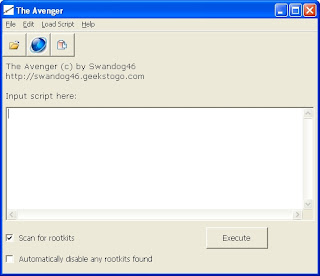
Enter following script commands in above GUI.
Files to delete:
%ProgramFiles%\messenger\msmsgs.exe
%ProgramFiles%\Network Monitor\netmon.exe
%SystemRoot%\system\netmon.exe
%ProgramFiles%\vmwareservice.exe
%SystemRoot%\System\VMwareService.exe
Registry keys to delete:
HKLM\System\ControlSet001\Services\VMWareService
HKLM\System\ControlSet002\Services\VMWareService
HKLM\System\CurrentControlSet\Services\VMWareService
and check to select
Automatically disable any rootkits found
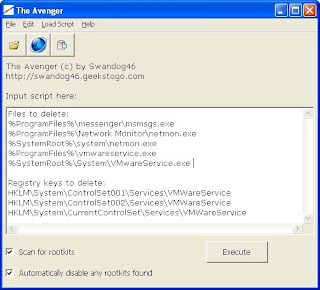
Now click on
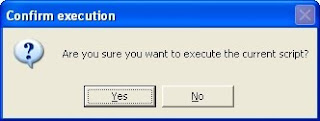
Execute button. The Avenger confirms the execute command. Click on
Yes button.
A warning message is displayed to alert user that that it is dangerous to edit ‘Services’ registry keys directly. Click on
Yes button.

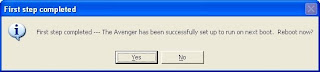
The Avenger informs that first step has completed and asks for your permission to reboot PC. Click on
Yes button.
After your PC reboots, The Avenger displays log file in Notepad. This log file is stored in backup.zip in Avenger folder in your system drive. All actions it takes are stored in backup.zip file, which is password-protected with password "
infected".
Wow! Your Windows desktop is now free from
W32/Neeris worm.


_PNG.png)